Trusted by leading organizations across Zambia






Reach every phone in Zambia — no app, no smartphone required. Developers start with a free 5-day proof-of-concept — 120 sessions included, shortcode issued instantly, no approval wait — then extend from K350/week or K1,200/month (excl. VAT). Organisations go live across all three operators through one gateway, with billing and analytics built in.
Self-serve, end to end. Create an account and verify your email — your shortcode is issued instantly, free, with a 5-day proof-of-concept and 120 sessions included. Point it at your HTTPS endpoint: we POST JSON, you reply JSON.
POST /your/ussd  →  { "session_id": "...", "user_input": "1" }
reply 200       →  { "response_string": "Welcome",
"continue_session": true }We handle it for you. Reach every customer on any handset — banks, government, utilities, NGOs — no app and no smartphone needed. Live in days.
Trusted by leading organizations across Zambia
Powerful tools to manage, monitor, and optimize your USSD gateway services from a single dashboard.
Monitor active sessions, response times, and service health with live updates and visual indicators.
Deep insights with daily, weekly, and monthly reports. Export data in CSV or JSON for further analysis.
Manage shortcode routes, callback URLs, and service endpoints with an intuitive configuration panel.
Test USSD journeys across Airtel, MTN, and Zamtel without needing a physical handset.
Search, filter, and export transaction logs with real-time streaming and advanced filtering.
Automated health checks with alerts for service degradation, timeouts, and endpoint failures.
From mobile money to citizen services, organizations across Zambia reach every handset — smartphone or not — through *388#.
Balance checks, transfers, and mini-statements over secure USSD sessions — no app or data bundle required.
Self-service menus for airtime, bundles, and subscriptions across Airtel, MTN, and Zamtel.
Micro-insurance enrollment, premium payments, and claims status accessible from any phone.
Market prices, input ordering, and advisory services delivered to farmers in rural areas.
Citizen registration, service requests, and notifications reaching every constituent.
Appointment booking, health tips, and survey collection through simple menu flows.
A complete toolkit — from session routing to billing — in one management console.
Smart shortcode routing with failover across all operators.
Design multi-level USSD journeys without writing code.
Live dashboards for sessions, funnels, and drop-off.
Per-session billing, client rates, and invoicing built in.
Test full journeys per network without a handset.
Searchable, exportable logs with real-time streaming.
Connect your services with REST callbacks and keys.
Self-service onboarding, API keys, and shortcodes.
From registration to production traffic — self-service developers are live the same day.
Register and verify your email — that is all. Your API keys and a live *388*N# shortcode are issued automatically with a free 5-day POC, no payment and no approval queue.
Build and test your USSD flows in the simulator, then wire up callbacks to your services.
Switch to production across all MNOs and watch real-time analytics, logs, and SLA health.
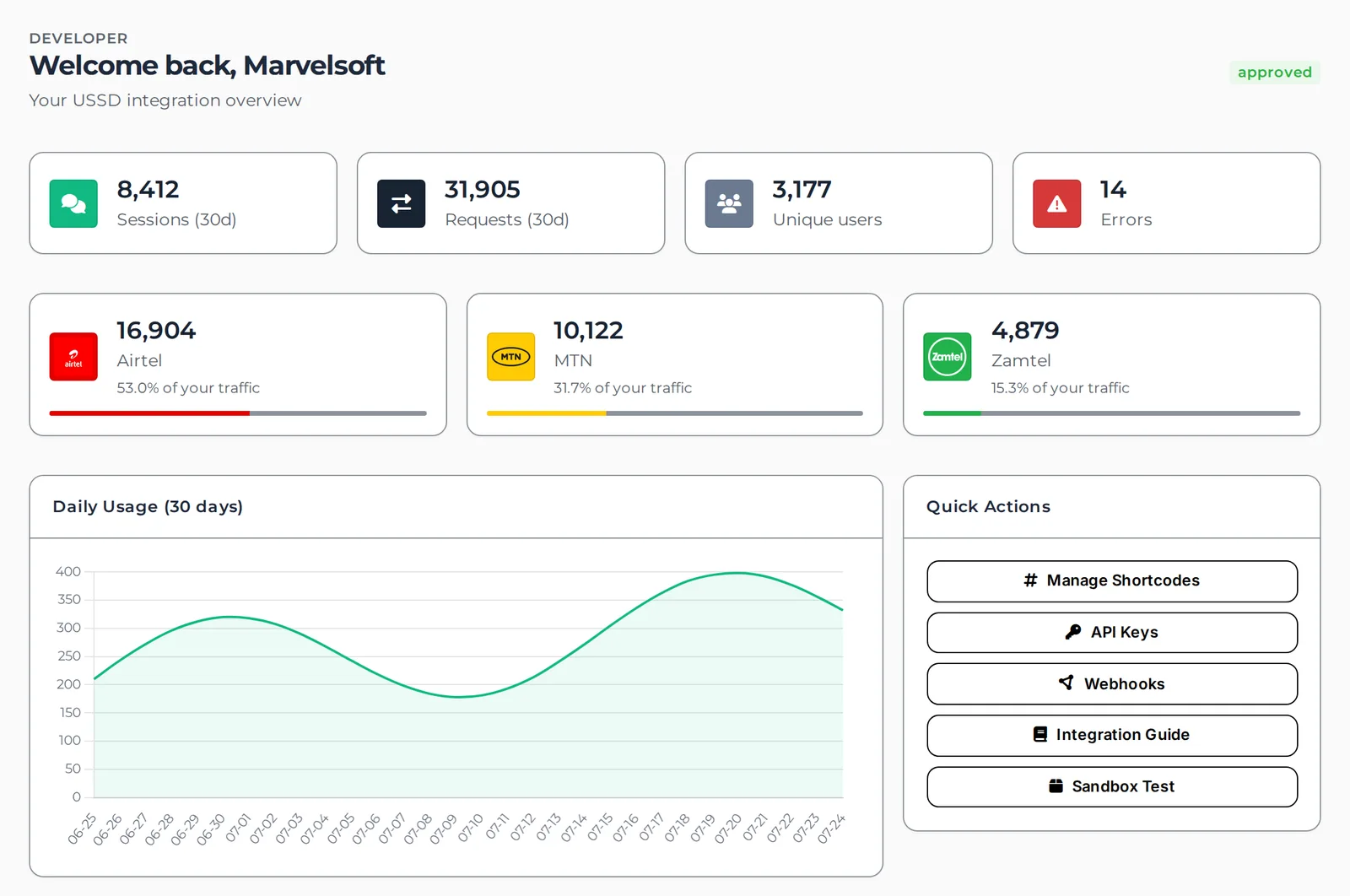
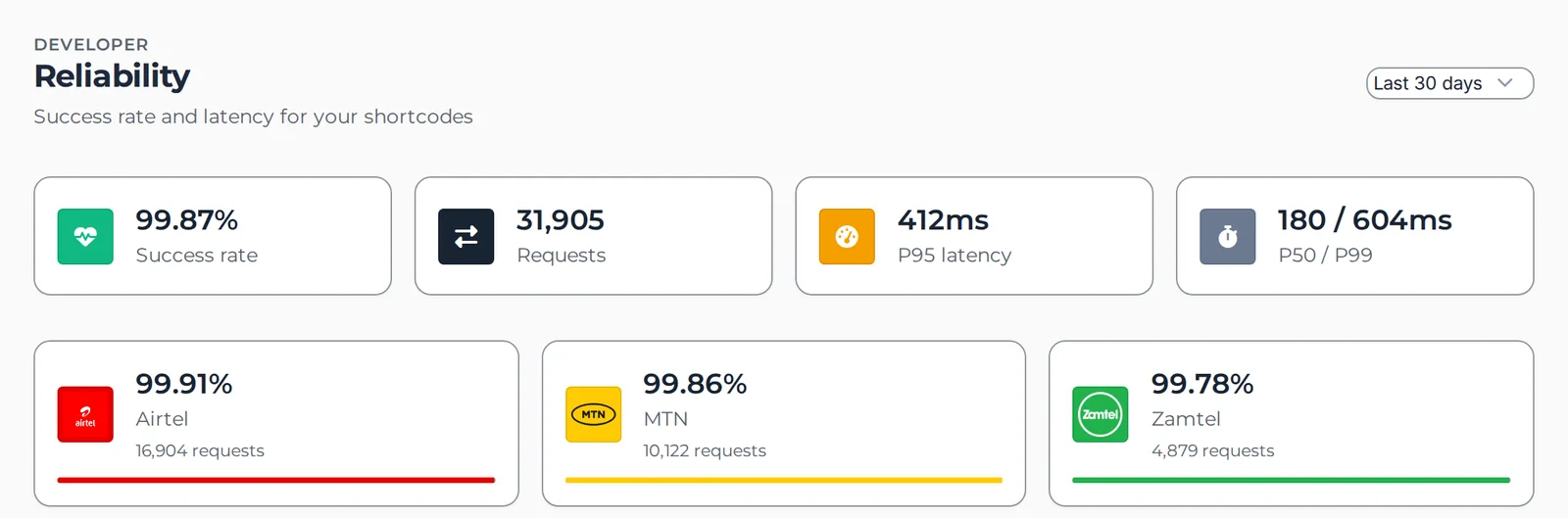
Traffic across all three operators, a browser simulator that dials your real shortcode, and reliability figures you can hold us to.
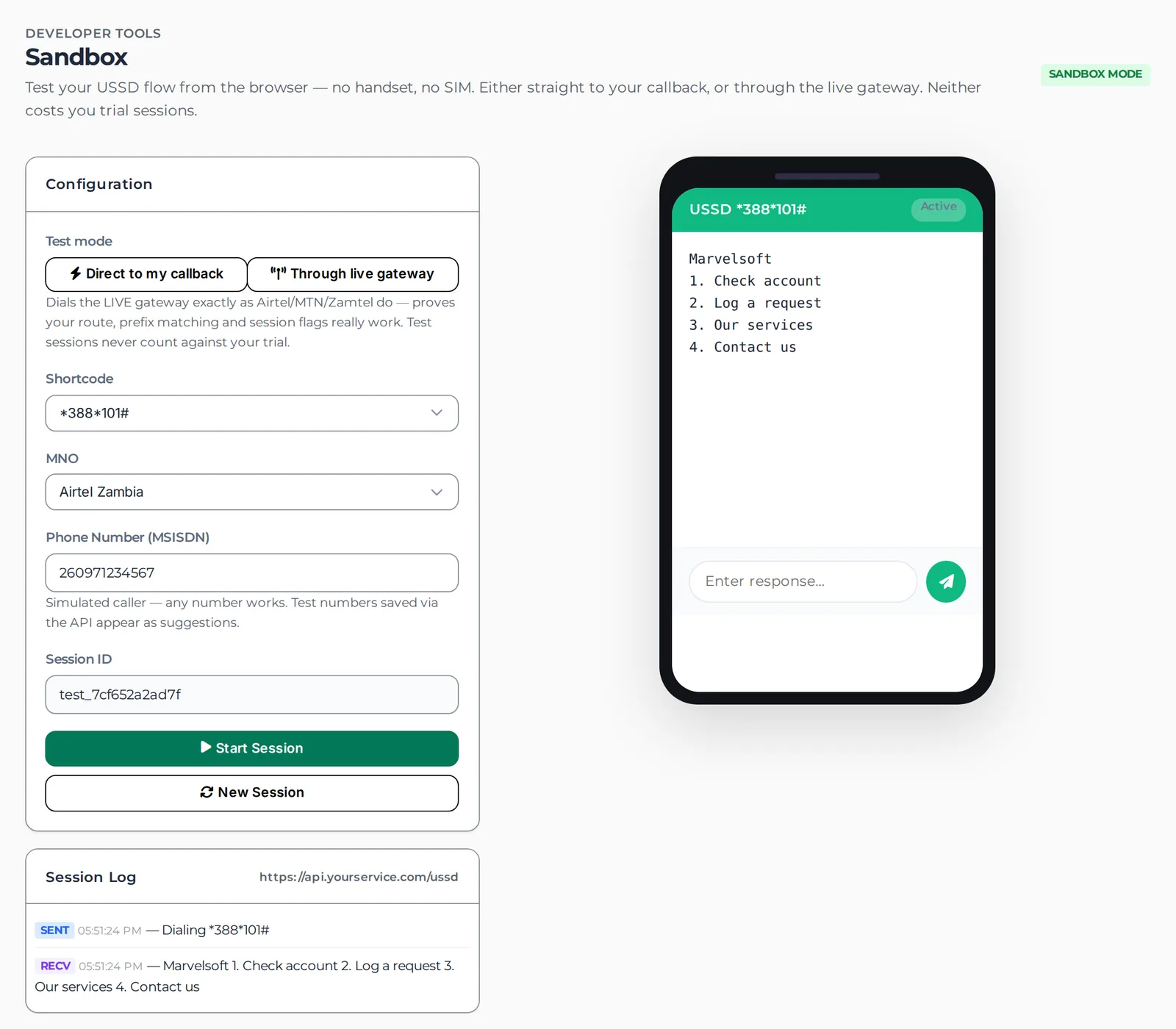
Point your *388*N# service at any HTTPS endpoint. For every keypress the OnTech gateway POSTs JSON to your URL, and you reply with JSON. That is the entire contract.
POST https://your-service/ussd
Content-Type: application/json

{
  "session_id": "17822920860361322",
  "msisdn": "260970000000",
  "user_input": "388*4",
  "is_new_request": true
}
HTTP 200
Content-Type: application/json

{
  "response_string": "Welcome to My Service\n1. Check balance\n2. Buy bundle",
  "continue_session": true
}
session_id — unique ID for the whole USSD dialog. Use it to correlate the steps of one session. You don't echo it back.is_new_request — "1" on the first request of a session, "0" on every request after. Sent as a string.input — what the subscriber entered (the dialed code on the first hit, e.g. 388*4; their keypress thereafter).msisdn — the subscriber's phone number. These four fields are the entire request — there is no mno, shortcode, request_id or session_data.response_string — the exact text shown on the subscriber's handset. Required.continue_session — true keeps the session open for the next input (a menu); false shows a final message and ends the session. Required.session_id. There are no status, state, or Freeflow (FC/FB) codes — the entire lifecycle is is_new_request coming in and the boolean continue_session going out. Send continue_session: false to end the session.CON/END are not accepted — a non-JSON body or a missing field results in “Service response error” for the caller.SCREEN 1 — subscriber dials *388*4#
→ OnTech POSTs:
{ "session_id": "S-7781", "user_input": "388*4", "is_new_request": true,
"msisdn": "260970000000" }
← you return:
{ "response_string": "Welcome to ACME\n1. Check balance\n2. Buy bundle",
"continue_session": true } // menu stays open
SCREEN 2 — subscriber presses 1
→ OnTech POSTs:
{ "session_id": "S-7781", "user_input": "1", "is_new_request": false,
"msisdn": "260970000000" }
← you return:
{ "response_string": "Your balance is K12.50.\nThank you for using ACME.",
"continue_session": false } // final screen, session ends
Your sessions, transactions, and subscriber data are protected at every layer of the gateway.
Short-lived JWTs with automatic refresh and role-based access control across every console.
All traffic between operators, the gateway, and your services is served strictly over TLS.
Every session and admin action is logged, searchable, and exportable for compliance.
Built-in data-subject request handling and retention controls for subscriber privacy.
Continuous health checks with alerting on latency, timeouts, and endpoint failures.
Automated flagging of unusual traffic patterns to catch abuse and fraud early.
Already own a code, want your own, or want to launch today under *388# — Ontech supports all three, across Airtel, MTN and Zamtel.
Already have a dedicated USSD shortcode? Ontech connects it to the gateway and routes it to your service across every network — you keep full ownership of the code.
Want your own dedicated *XYZ# code? Ontech guides you through acquisition and provisioning with the regulator (ZICTA) and the mobile operators, and handles the technical setup end to end.
Go live fast on a shortcode sub-string under Ontech's *388*N# space, with your own branded menus and submenus — no dedicated-code lead time or cost.
Start with a free proof-of-concept, extend week by week, and scale onto volume pricing when you're ready. No per-operator charges, no hidden setup costs.
Sign up, verify your email, and your *388*N# shortcode is issued instantly — free. Prove your concept with 120 real sessions over 5 days, then extend week by week, paid by mobile money.
Entry rate. At the highest volumes your effective rate falls to about K0.0007 per session. Bands are progressive — each rate applies only to the sessions inside its band, so your bill never jumps at a threshold.
A shortcode occupies limited national numbering whether or not it carries traffic, so inactive codes are not free to hold — and two-digit codes are the scarcest of all, which is why their minimum is higher. This applies once you move onto per-session volume billing — not to the free POC, and not to weekly or monthly plans.
Need a dedicated shortcode, custom routing or an enterprise SLA? Book a demo.
The service commitments regulated banks and mobile operators expect — guaranteed uptime, round-the-clock monitoring, and a defined escalation path with response times you can put in a contract.
| Severity | Definition | Response | Resolution target | Coverage |
|---|---|---|---|---|
| Sev-1 Critical | Service down or payments failing across a network | 15 minutes | 4 hours | 24×7×365 |
| Sev-2 High | Major function degraded; a single MNO or shortcode affected | 30 minutes | 8 business hours | 24×7×365 |
| Sev-3 Medium | Minor or partial impact with a workaround available | 4 business hours | 2 business days | Business hours |
| Sev-4 Low | Question, configuration change, or enhancement request | 1 business day | Scheduled | Business hours |
Business hours 08:00–17:00 CAT, Mon–Fri. Severity-1 and -2 incidents are covered around the clock. Response and resolution targets, service credits, and dedicated staffing are formalised in your enterprise agreement.
Our Network Operations Centre watches every session, latency reading and endpoint around the clock, with automated alerting and failover across Airtel, MTN and Zamtel before you notice.
Enterprise customers get a named account manager and technical contact, quarterly service reviews, and a direct escalation line — not a shared ticket queue.
A 24-hour incident hotline and dedicated support inbox for Severity-1/2 events, backed by a documented escalation matrix through engineering to management.
Uptime, response and resolution commitments written into a signed SLA, with service credits when a target is missed — the accountability regulated institutions require.
Redundant infrastructure, encrypted backups and tested disaster-recovery procedures keep your *388# service available through incidents and maintenance windows.
Full audit trails, uptime and performance reports, and data-retention controls — delivered on the cadence your auditors and regulators expect.
continue_session true to advance menus and false to end — so deep flows are built as a sequence of concise screens rather than one long page.Explore the other platforms built by Ontech Solutions.
Campaigns, OTPs and alerts across Airtel, MTN and Zamtel — with delivery reports and a mobile app.
Explore Bulk SMSEnterprise ICT management — track assets, services and support in one place.
Explore ICTMSelf-hosted business email you own — private, secure, on your own domain.
Explore ontechmailFree school management for Zambia — students, fees, results and communication.
Explore ZamSkoolsLife insurance platform — policies, premiums and claims, end to end.
Explore LifeIComprehensive insurance management for insurers and brokers.
Explore InsuranceEnterprise payment gateway — collect and disburse across Zambia.
Explore PaymentsTrack leads, customers and deals the way Zambian business works.
Explore CRMCloud business phone system — extensions, IVR and call routing.
Explore Cloud PBXSchool bus booking from any phone — routes, seats and payments.
Explore TransportDevelopers — sign up and your shortcode is live the same day, with a free 5-day POC and 120 sessions included. Organisations — book a demo and we'll get your *388# service live in days.